Sandiko Sand Coloring Game
Experience the calm of sand art coloring with Sandiko, a tactile color by number game featuring 147 cute drawings and soothing ASMR sounds.
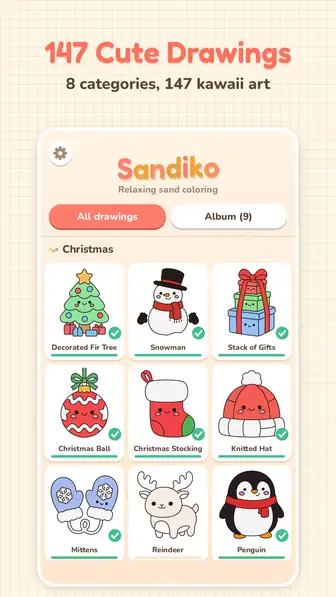
Sandiko is a sand coloring game designed for those who appreciate quiet, creative activities on their mobile devices. This application brings the traditional hobby of sand art coloring to your screen, allowing you to fill intricate shapes with vibrant, textured grains. You can choose from a wide variety of kawaii-style illustrations, ranging from holiday scenes to mythical creatures. The experience is focused on relaxation, providing a digital space where you can focus on the simple act of applying color without any pressure or time constraints.
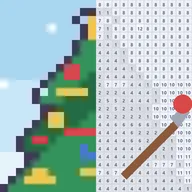
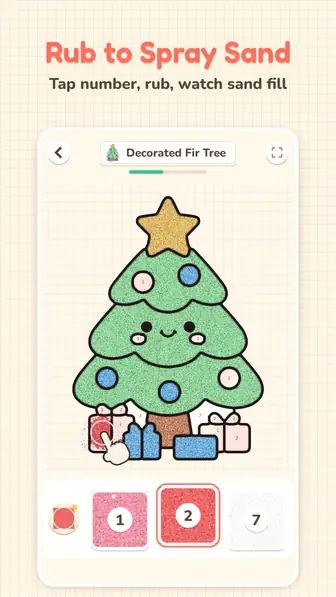
The game works as a color by number sand art experience: each shape carries a shiny sticker with its number. When you pick the matching sand and rub the shape, the sticker peels off and colored sand sprays where your finger goes, getting denser and denser until the shape is full. It is a satisfying visual and sound experience that echoes real sand painting.
How to create sand art coloring pieces
Starting your first piece of sand art is a simple and guided process that introduces you to the core mechanics of the game.
- Open the gallery and select one of the 147 available drawings to begin your session.
- Look for the shape on the drawing that is currently lighting up with a specific number.
- Tap the sand tile at the bottom of the interface that matches the number on the glowing shape.
- Rub your finger across the glowing area to peel off the sticker and spray colored sand until the shape is full.
- Repeat this process for every numbered section until the entire illustration is covered in sand.
- Watch the final light sweep across your finished work before saving it to your personal album.
The rules of this sand coloring game
- Each shape must be filled with the specific sand color that corresponds to its assigned number.
- You must rub the screen continuously to spray sand; the grains will become denser the more you rub.
- Picking an incorrect color does not damage the drawing because the grains will simply slide away and fade.
- The next numbered shape only lights up once the current section is completely filled with sand.
- Progress is saved automatically, so you can stop and start again at any time.
- Completed drawings are stored in an in-game album where they can be viewed or colored again.
Drawing categories and difficulty
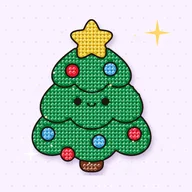
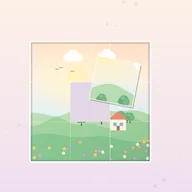
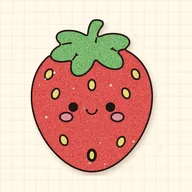
The game features a massive library of 147 drawings organized into eight distinct categories. You can explore a wide range of themes, starting with the Christmas category which contains 25 holiday-themed drawings. Other large collections include 28 different animals, 26 yummy treats like desserts and snacks, and 18 dinosaurs. For those who prefer smaller sets, there are categories for sea friends, mythical unicorns and magic, various vehicles, and peaceful nature scenes. This variety ensures that you always have a new subject to work on regardless of your current mood.
While 121 of these drawings are available to play immediately, there are 26 bonus drawings that require special steps to access. You can earn a free bonus drawing for every five regular drawings you finish, or you can choose to unlock one immediately by watching a short video. The difficulty remains consistent throughout the game, as the focus is on the meditative quality of the work rather than complex challenges. You can use the pinch-to-zoom feature to get a closer look at drawings with smaller sections, allowing for a 6x magnification of the canvas.
Special pieces and twists
- Classic Sand: The standard sand, always free for every drawing.
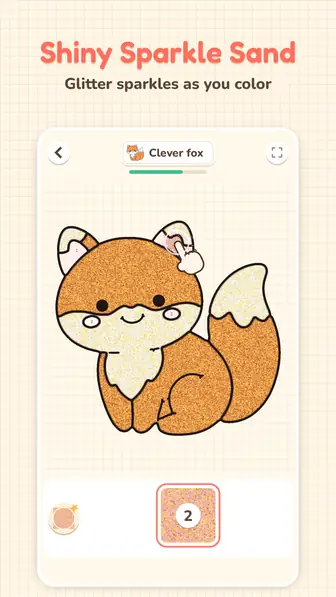
- Magic Sands: Special textures including gold glitter, silver glitter, and sparkly snow that can be unlocked with a short video.
- Two-tone Gradient Sand: A magic sand with a two-tone gradient, unlocked for a drawing with a short optional video.
- Extra Shiny Sand: A magic sand with an extra shine, unlocked for a drawing with a short optional video.
- Guiding Hand: A visual tutorial element that appears on the first drawing to show you exactly how to rub and spray.
Strategy for the best sand painting results
Use the zoom for small shapes
Some drawings in the yummy treats or sea friends categories have very small details. Use two fingers to pinch and zoom in up to 6x so you can see exactly where the sand is landing.
Watch the sand density
The sand gets denser the more you rub your finger over a shape. Keep rubbing until the shape is full: the next shape then lights up on its own.
Try magic sands for highlights
A magic sand applies to a whole drawing: gold or silver glitter sand makes a finished picture sparkle. These special sands suit the unicorns and magic category very well.
Ignore the wrong colors
If you accidentally tap the wrong color and start rubbing, do not worry about making a mistake. The grains will not stick to the surface and will simply fade away without affecting your progress.
Unlock bonus drawings for free
You do not always need to watch a video to get new content. By completing five standard drawings, you automatically receive a bonus drawing as a reward for your progress.
Customize your ASMR experience
The game features soft sand sounds and calm music to help you relax. You can toggle either of these off in the settings if you prefer to listen to your own audio while you paint.
Save your favorites
Once a drawing is finished and the golden light sweeps over it, it is saved in your album. You can revisit this album later to share your favorite pieces as pictures with your friends.
Who should play this sand coloring game
This sand coloring game is ideal for anyone looking for a low-stress creative outlet. It is particularly well-suited for fans of sand art coloring for adults who want a mess-free way to enjoy the hobby. The kawaii art style is a treat for anyone who loves dinosaurs, unicorns and cute animals. Because the game works fully offline, it is a perfect companion for long commutes or travel where internet access might be limited. Anyone who finds the sound of falling sand or the visual of peeling stickers satisfying will appreciate the ASMR qualities of this application.
Where to find Sandiko
Sandiko is an Android game that will be coming soon to Google Play. It is not yet published. Please note that there is no browser version of this game, and it cannot be played on a computer or through a web portal. Once it is released on the Google Play Store, you will be able to install it on your Android phone or tablet to enjoy the full library of 147 drawings for free.
Frequently asked questions about Sandiko
Is there a sand coloring game online for browsers?
No, Sandiko is strictly an Android application and does not have a browser-based version. You will need an Android device to play the game once it is released on Google Play.
Can I play this sand painting game without an internet connection?
Yes, the game works fully offline once it is installed. You can color all 121 standard drawings and any unlocked bonus drawings without needing a data connection.
Are there any timers or limits on how much sand I can use?
There are no timers and you have access to unlimited sand for every drawing. You can take as much time as you need to finish your sand art coloring sheets at your own pace.
How do I unlock the glitter and gradient magic sands?
Magic sands like gold, silver, and sparkly snow can be unlocked for a specific drawing by watching a short video. The classic sand remains free and available for all shapes at all times.
What happens if I pick the wrong color in this sand coloring game?
Nothing bad happens if you choose the wrong color. The grains will simply slide off the drawing and fade away, allowing you to select the correct number and continue without penalty.
How many drawings are included in the game?
There are a total of 147 drawings across eight categories. This includes 121 drawings that are open from the start and 26 bonus drawings that you can unlock as you play.
Can I color the same drawing more than once?
Yes, every drawing you complete is saved in your personal album. You can select any finished piece from your album to color it again from the beginning.
Last updated: 2026-11-08